

Frequently Asked Questions (FAQ)
Opening Hour
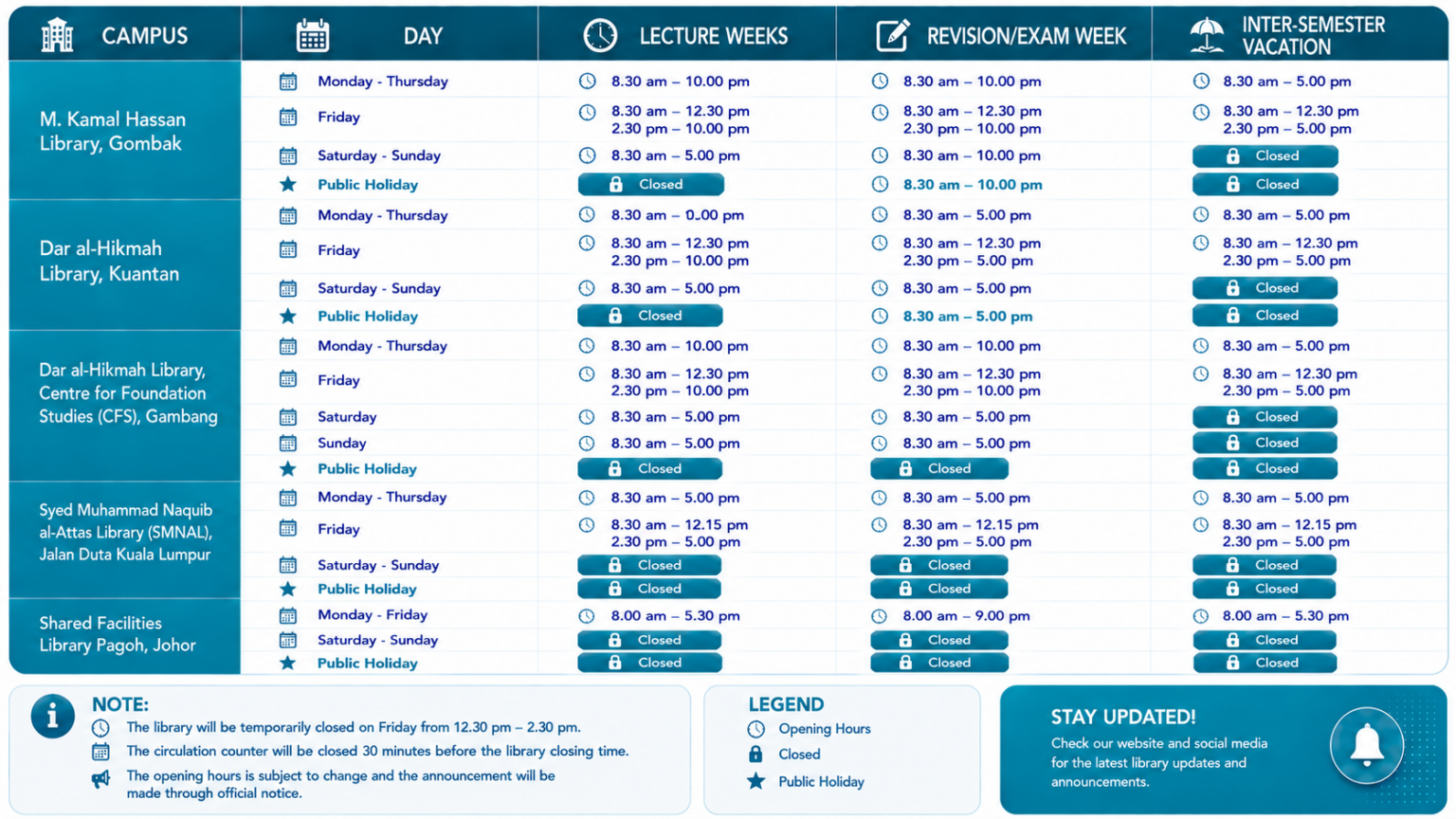
What are the library opening hours?
Book Borrowing
How many books can I borrow with my library card?
The number of books you can borrow depends on your status:
- Undergraduate Students: 15 books for 30 days
- Postgraduate Students: 20 books for 30 days
- Academic Staff: 30 books for 60 days
- Administrative Staff: 20 books for 60 days
Book Returning
How can I return books?
1. Return at the Library Counter.
2. Other Return methods vary by campus:
- Gombak Campus: Library Smart Bookdrop
By post (Recommended: Poslaju) - IMC Campus: Library Bookdrop
- CFS Campus: Library Bookdrop
- SMNAL Campus: Check with campus library
- Pagoh Campus: Check with campus library
Can I return books to Gombak library by post/courier?
Yes, you can return books by post with these guidelines:
- Recommended courier: POS LAJU
- Address: Dar al-Hikmah Library (Central)
International Islamic University Malaysia (IIUM)
P.O Box 10, 50728 Kuala Lumpur, Malaysia
(Attn: Mdm. Zalirawati Anita Jusoh) - Phone: +603-6421 4825 (Circulation Counter)
- Notification: Email: ira_anita@iium.edu.my after sending with:
1. Your name.
2. Matric number.
3. Total number of book.
Book Renewal
How can I renew my books?
You can renew books online by:
- Logging into your library account at: https://hikmahlib.iium.edu.my/
- Selecting the items you want to renew
- Following the renewal prompt
How many times can I renew?
Book renewal policies:
Books can be renewed online twice. If you need further renewals, contact the relevant person:
- Gombak: Mdm Zalirawati Anita Jusoh – ira_anita@iium.edu.my
- IMC: Br Iskandar – isadnan@iium.edu.my
- CFS: Mdm Siti Nor – nors@iium.edu.my
- SMNAL: Br Zaki – zakirash@iium.edu.my
- Pagoh: Br Aiman – muhdaiman@iium.edu.my
Lost/Damaged Books
How do I report lost or damaged books?
To report lost or damaged books:
Contact the Circulation Counter at +603-6421 4825
Or email the relevant person:
- Gombak: Mdm Zalirawati Anita Jusoh – ira_anita@iium.edu.my
- IMC: Br Iskandar – isadnan@iium.edu.my
- CFS: Madam Siti Nor – nors@iium.edu.my
- SMNAL: Br Zaki – zakirash@iium.edu.my
- Pagoh: Br Aiman – muhdaiman@iium.edu.my
Library Membership
How do I apply for library membership?
Membership application process:
1. For IIUM faculty, students and staff, to register the library membership:
Visit the library homepage and look for “Library Catalog” then go to “Library Account” then click “First-time User Activation” then follow the instruction.
2. For other membership types or external members, contact:
Circulation Counter at +603-6421 4825 or email the relevant person:
Gombak: Mdm Zalirawati Anita Jusoh – ira_anita@iium.edu.my
IMC: Br Iskandar – isadnan@iium.edu.my
CFS: Madam Siti Nor – nors@iium.edu.my
SMNAL: Br Zaki – zakirash@iium.edu.my
Pagoh: Br Aiman – muhdaiman@iium.edu.my
Then, fill in the online application form for external members.
What should I do if I want to continue using the library after graduation?
As an alumni:
1. You can enter the library by showing your alumni card to access physical resources.
2. To borrow books, you need to register as an external member.
3. Contact the Circulation Counter at +603-6421 4825 or email the relevant person for more information:
Gombak: Mdm Zalirawati Anita Jusoh – ira_anita@iium.edu.my
IMC: Br Iskandar – isadnan@iium.edu.my
CFS: Madam Siti Nor – nors@iium.edu.my
SMNAL: Br Zaki – zakirash@iium.edu.my
Pagoh: Br Aiman – muhdaiman@iium.edu.my
Library Clearance
How do I apply for library clearance?
Clearance application process:
1. Important: Check and confirm your graduating status at I’Ma’luum before applying.
2. Visit Student clearance system and check your library status. If its clear, then your library clearance is done. But if its “Not Clear” kindly contact:
Circulation Counter at +603-6421 4825 or email the relevant person:
Gombak: Mdm Zalirawati Anita Jusoh – ira_anita@iium.edu.my
IMC: Br Iskandar – isadnan@iium.edu.my
CFS: Madam Siti Nor – nors@iium.edu.my
SMNAL: Br Zaki – zakirash@iium.edu.my
Pagoh: Br Aiman – muhdaiman@iium.edu.my
Interlibrary Loan
How do I borrow books from other campus libraries?
Interlibrary loan process:
- Visit https://division.iium.edu.my/lib/inter-library-loan/
- Scroll down to “ILL related forms”.
- Please select the appropriate option based on your user category:
i.IIUM Community – for IIUM staff and students.
ii.Non-IIUM Community – for users outside IIUM. - Please fill in the required details and click “Submit”.
How do I get books not available in Dar al-Hikmah Library?
Interlibrary loan process:
- Visit https://division.iium.edu.my/lib/inter-library-loan/
- Scroll down to “ILL related forms”.
- Please select the appropriate option based on your user category:
i.IIUM Community – for IIUM staff and students.
ii.Non-IIUM Community – for users outside IIUM. - Please fill in the required details and click “Submit”.
How long can I keep interlibrary loan books?
You may borrow interlibrary loan books for 2 weeks.
How many interlibrary loan books can I borrow at once?
Maximum of 2 interlibrary loan books at a time.
Can I extend interlibrary loan books during pandemic?
During pandemic:
We advise you to post the books to Dar al-Hikmah Library at:
Address:
Interlibrary Loan Services, Circulation & Loans Unit,
Dar al-Hikmah Library
International Islamic University Malaysia
Jalan Gombak, 53100 Kuala Lumpur.
(Attn: Head, Circulation and Loans Unit) or send an official request to extend borrowing for research to iiulib2@iium.edu.my
How do I get access to IRep articles?
To access IRep articles:
1. Visit: https://www.iium.edu.my/division/lib
2. Scroll down to the IIUM Discovery Service.
3. Search for the article using its title.
4. If the full text is available, click the PDF icon to access the article.
5. If the full text is unavailable:
6. IIUM community members: Click “Request for Interlibrary Loan” to submit your request.
7. Non-IIUM community members: Please request the article through your institution’s library.
Note: Articles from IRep are indexed and discoverable through the IIUM Discovery Service. Access to the full text depends on the article’s copyright and access status. Some articles are available as Open Access, while others may not be accessible in full text due to publisher copyright or licensing restrictions.
Library Fines
How do I check my fines?
To check fines:
1. Log in to your library account at: https://hikmahlib.iium.edu.my/cgi-bin/koha/opac-user.pl
2. Your outstanding fines will be displayed in your account.
How do I pay?
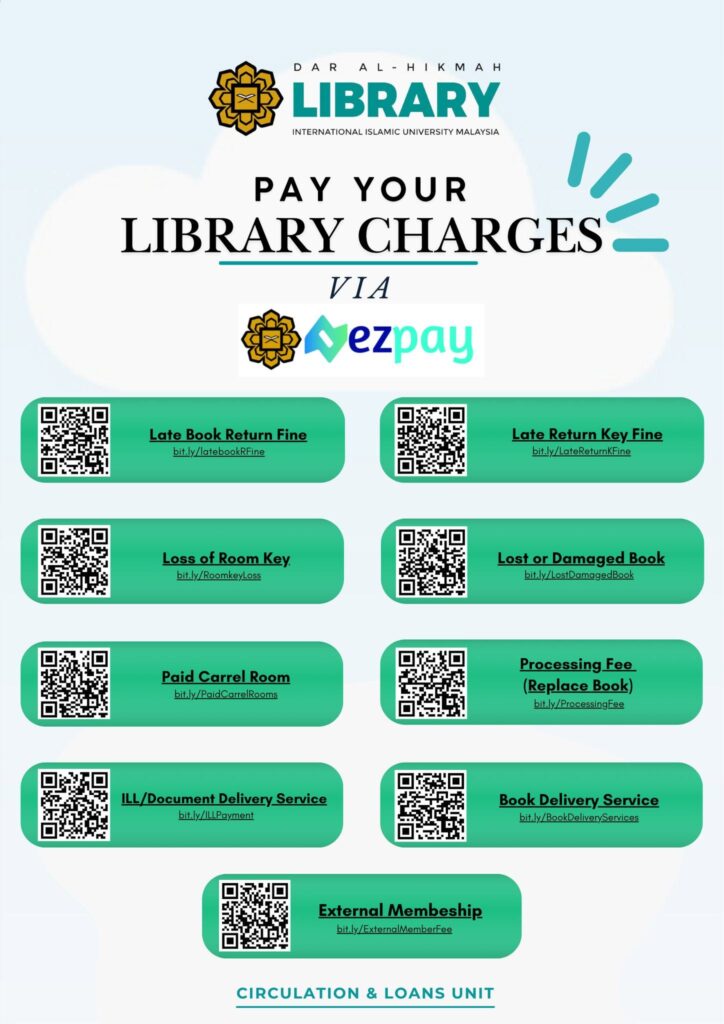
Library charges can now be paid conveniently through IIUM EzPay. There is no longer a need to submit proof of payment manually.
Links for IIUM EzPay by category of payments:
1. External Membership Fee: https://ezpay.iium.edu.my/pay/US9H69Kr
2. ILL/Document Delivery Service: https://ezpay.iium.edu.my/pay/kRYEPZoR
3. Late Return Book Fine: https://ezpay.iium.edu.my/pay/heAxXbdJ
4. Late Return Key Fine: https://ezpay.iium.edu.my/pay/9oN4rNLr
5. Loss of Room Key: https://ezpay.iium.edu.my/pay/LH5L6PLi
6. Lost or Damaged Book: https://ezpay.iium.edu.my/pay/SwYoPFSQ
7. Paid Carrel Rooms: https://ezpay.iium.edu.my/pay/7UZKpta6
8. Processing Fee (Replace Book): https://ezpay.iium.edu.my/pay/AYnCh7b3
QR Code for IIUM EzPay links by category of payments:
Past Exam Papers
How can I access past examination papers?
We have discontinued the provision of past exam papers. Please refer to your respective Kulliyyah (Faculty/Department) for access to past examination materials.
Where can I get exam papers not in the library collection?
Contact your Kulliyyah. We have discontinued the provision of past exam papers.
User Education / Information Literacy Class
Where can I learn about information seeking?
Join our Information Literacy Classes. For more details about the module, click here: https://division.iium.edu.my/lib/learning-support/information-literacy-class-2/
Learning Support
How can I join a Library Skills Class?
You can join our Library Skills Classes to enhance your information searching, research, and referencing skills. Visit the Information Literacy page to explore the available modules, then submit your request through the Information Literacy Request Form.
- Information Literacy: https://division.iium.edu.my/lib/learning-support/information-literacy-class-2/
- Information Literacy Request Form: https://tinyurl.com/vvm46zcy
Liaison Librarians
How can I find my liaison librarian?
To find your liaison librarian, visit the Contact Us (https://division.iium.edu.my/lib/contact-us/) page on the library website.
Liaison librarians are listed according to their campus and Kulliyyah.
Journals & Publications
How can I check for predatory journals/publishers?
You may refer to https://beallslist.net/
How can I get a list of indexed journals in Scopus?
1. Visit library website at https: //division.iium.edu.my/lib/
2. Click icon “Databases & E-Books”.
3. Scroll down and click “Scopus”.
4. Click “Sources” menu available at the top right corner.
5. Search by “Subject area”.
6. Click “Download Scopus Source List”.
How can I verify if an article is published in an indexed journal?
Search your article in the Scopus and Web of Science databases to verify its indexing status.
Off-Campus Access
Who can use off-campus access?
Off-campus access is available for active students and staff using the IIUM credentials (IIUM staff/student ID and password).
How to use off-campus access?
1. Go to library website at: https: //division.iium.edu.my/lib/
2. Click on “Off Campus Access” button.
3. Follow the instruction.
Online Databases
Why should I use databases instead of internet searches?
Library databases are specifically designed for academic research. Unlike general internet search engines, they provide:
1. Credible and authoritative sources – Most content is published by reputable academic publishers and has undergone peer review or editorial review.
2. Reliable and up-to-date information – Information is carefully curated and regularly updated.
3. Advanced search features – Search by subject, author, publication date, document type, and more to find relevant results quickly.
4. Access to full-text scholarly resources – Including journal articles, e-books, conference papers, theses, and reports that may not be freely available on the internet.
5. Accurate citations – Many databases allow you to export citations directly in styles such as APA, MLA, or Chicago.
6. Higher quality research – Using scholarly sources strengthens the credibility and academic standard of your assignments and research.
How can I access online databases?
No registration is required. Through the Library’s Online Databases page, click on:
- On campus: Access is available automatically through the IIUM network.
- Off campus: Log in using your IIUM credentials to access subscribed databases remotely.
Law Matters
Do we have access to Malaysia Syariah Court cases?
Yes, the library provides access to Malaysia Syariah Court cases through the following resources:
1. Jurnal Hukum: Available in printed version only at the M. Kamal Hassan Library, Gombak campus.
2. Shariah Law Reports (ShLR): Accessible online via the Lexis+ Malaysia database.
Do we have access to LawNet?
Yes, the library provides access to LawNet. To obtain the password, please contact the Reader Advisory Desk on Level 1 (ext. 3815) or Level 2 (ext. 4815).
⚠️ Important Note for Off-Campus Access:
If you are accessing LawNet from outside the campus or without the IIUM Wi-Fi, do not log in through the “Off-Campus Access”. Instead, go directly to the LawNet database website and click “Access Here” to log in using the credentials provided above.
Does the IIUM Library hold copies of Jurnal Hukum, and what is the latest volume available?
Yes, the IIUM Library holds copies of Jurnal Hukum. Please note the following details regarding its availability:
- Format: Available in printed/physical version only.
- Status: For reference only.
- Location: Available at M. Kamal Hassan Library, Gombak Campus.
- Latest Issues: The latest volumes available in our collection are for the year 2025: Volume 59 Part 1 and Volume 59 Part 2.
E-Resources & E-Books
How do I access e-books?
Visit the Library website:
1. Click Database & e-Book.
2. Select the database or e-book platform from the list.
3. Search for the title, author, or subject.
4. Click View Online or Full Text to access the e-book.
Note: If you are accessing from off campus, log in to Off Campus Access using IIUM credentials.
Why can't I access certain e-book titles?
There are several possible reasons:
1. The Library does not subscribe to that specific e-book title. While the database is available, not every e-book it contains is included in the Library’s subscription.
2. Your login is working correctly, but the title is not part of IIUM Library’s subscribed collection.
3. The e-book may have access restrictions, such as a limited number of simultaneous users or temporary publisher restrictions.
Need assistance? Contact the Library or use the Interlibrary Loan (ILL), to request the title.
Where can I find Arabic collections for Islamic studies?
You can access our Arabic Islamic Studies collection through both online resources and printed materials:
1. Online Resources:
- Subscribed Database: We highly recommend searching the al-Manhal e-Books database.
- Open Access: You can explore free digital resources via the IIUM Library Open Access Resources page.
2. Printed Collections:
- Online Catalog: Check the availability of physical books through the IIUM Hikmah Library Catalog.
- Physical Location: Visit the M. Kamal Hassan Library. The printed Arabic Islamic Studies collection are located on Level 2.
IIUM Theses Repository
What is the IIUM Theses Repository?
The IIUM Theses Repository is the official digital repository for postgraduate theses and dissertations produced by IIUM students.
Who can use the IIUM Theses Repository?
Anyone may search and view the repository records. Access to full-text theses may vary depending on the author’s access permissions and University’s policy.
How to access IIUM theses and dissertations?
Why can't I access the fulltext of some theses?
Some theses are not available for full-text access because they may be under an embargo period include confidential or sensitive information.
Full-text access to certain theses is also restricted and is available to only IIUM academics and students only.
Who can access the fulltext of all theses in the repository?
IIUM Academics and students: Sign in with Microsoft lives credentials for full-text access.
What can non-authorized users still see?
Non-authorized users can access Open Access theses in full. For restricted theses, users may only view the bibliographic record, abstract, and the first 24 pages of the thesis as a preview.
What types of access are available in the IIUM Theses Repository?
The IIUM Theses Repository provides three types of access for theses: Open Access, Restricted Access, Embargoed Access and Confidential.
Each type determines how much of the thesis can be viewed or downloaded.
For other Malaysian universities:
Browse: Malaysian Thesis Online at https://mytheses.my/search/
IIUM Repository (IRep)
What is IRep?
For more detailed information, click here.
Copyright
What is copyright?
The Library no longer handles copyright operations. All copyright-related matters are now managed by the Technology Transfer Unit, Research Management Centre (RMC). For further information, please visit the Technology Transfer Unit page: https://centre.iium.edu.my/rmc/staff-directory/tto/
Facilities
How can I access the Wi-Fi service in the library?
Wi-Fi is available free of charge, and users can connect using:
- IIUM-Student for students.
- IIUM-WiFi for guests.
Who is eligible to use the library facilities?
Library facilities are available for use by academic staff, other staff members, and students.
How can I book library facilities?
Click on the Facilities tab, check out the venue and fill out the online booking form with your Google account.
Is there a printing service available?
Printing services are not available at the moment.
What’s the process for external parties to book the auditorium or other venues?
You can email the library management at library@iium.edu.my or call +603-64214000 ext. 3838 for more details.
Is there a self-checkout service available?
Yes, we’ve made it possible for customers to borrow books on their own. We encourage everyone to use the self-check machines located near the Circulation Counter on Level 2 for quick and easy self-service borrowing.
Is a book return machine service available?
Yes, there’s a self-service ‘smart’ book return available for customers at the library entrance.
Are there services available for individuals with disabilities?
Facilities for people with disabilities are available on the second floor. Feel free to ask the library staff if you need any help.
Does the library offer study rooms?
We offer Study Rooms, Carrel Rooms, and Discussion Rooms. For more information, please contact the Circulation Counter at +603-6421 4825.
Who can use the Learning Commons Area?
The MBSB AZKA-PPZ Corner welcomes all IIUM students, staff, and researchers, offering a fresh boost to your study and work experience. Drop by today and discover a new level of productivity at the Dar al-Hikmah Library. Find us on Level 1 of the M. Kamal Hassan Library, Gombak Campus, with a cozy capacity of 50.
Does the library have a computer lab available for internet access?
The computer labs on Level 2 are mainly used for library-run education classes. When no classes are in session, users are welcome to use the PCs for academic work.
Does the library have a student lounge?
Yes, there’s a student lounge on the second floor, equipped with a presentation area and an LCD projector, plus two vending machines stocked with soft drinks.
Other Services
How can I check for plagiarism using Turnitin?
Turnitin accounts are managed entirely under Centre for Postgraduate Studies (CPS).
Kindly contact the following for the access into “turnitin”:
Name: Nor Farihah Bt Mahamad Naser
Contact No: 03-6421 5208
e-mail: farihahnaser@iium.edu.my
For more details: https://centre.iium.edu.my/cps/turnitin-software/
How can I verify Publication Fee Facilitation?
This initiative is managed by the Research Management Centre (RMC). Please download the Publication Facilitation Form from the following page: https://centre.iium.edu.my/rmc/download/publication-facilitation-form/
Kindly complete the form and submit your application to the Grant Management Unit, Research Management Centre (RMC).
Where can I find Publication Fee Facilitation guidelines?
How do I access IIUM Guest WiFi?
The guest Wi-Fi access steps are as follows:
- Network Selection: Select IIUM-WiFi from your device’s Wi-Fi list (no initial password is required).
- Registration: When the browser redirects to the guest portal, choose Self-Registration.
- Verification: Enter your details and verify your identity via the One-Time Password (OTP) sent to your mobile number.
- Access: Submit to receive login credentials granting 24 hours of access.